IAM Decisions in SMB Zero Trust Adoption
Small businesses can adopt zero trust by enforcing MFA and least-privilege access first.
Attackers do not break into most small businesses anymore. They log in. The perimeter that once defined a company's security boundary has dissolved. With hybrid work, employees connect from home networks, coffee shops, and airports. SaaS tools hold customer data, financial records, and intellectual property outside any office firewall. Cloud workloads run wherever the cloud provider places them. There is no network edge left to defend. What remains is identity: the set of credentials, permissions, and access paths that determine who can reach what. Exabeam's Zero Trust 2026 guide states the consequence directly. Every user and device must be authenticated before any access is granted, regardless of location.
The scale of the problem is not theoretical. Roughly 70% of breaches are linked to identity failures, per a 2026 industry analysis. The attack pattern is consistent across incidents: compromised credentials, phishing, or credential stuffing. Attackers do not find a vulnerable port and tunnel through. They obtain a working password and use it the way a legitimate user would. This is why small businesses face a disproportionate threat. They hold the same attractive data as larger organizations, payment details, customer records, intellectual property, without the access controls those larger organizations have built. Fewer than half of small organizations stop ransomware attacks before encryption or extortion occurs.
Identity sprawl compounds the exposure. Every new SaaS tool adds another directory. Every contractor adds another account. Every temporary hire adds access that may not be revoked cleanly. The data scatters across unmanaged directories and shadow applications. Orphaned accounts accumulate. Privileges stack up as employees change roles without anyone auditing what they still have. None of this happens through a deliberate decision. It happens through growth without governance. The result is a landscape where the attacker's job, finding a valid credential with useful access, keeps getting easier.
What Zero Trust actually requires of a small business without a security team
Zero Trust is not a product someone buys or a project with a completion date. It is a set of verification principles that run continuously. For a small business without a dedicated security team, that framing matters. The practical starting point is a small number of identity and access management decisions, not a multi-year platform overhaul.
Exabeam's Zero Trust 2026 guide defines three core principles. Always verify: no user or device gets implicit trust. Least privilege: every account holds the minimum permissions needed for its task. Assume breach: operate as if compromise has already occurred. These principles do two things at once. They reduce breach risk immediately, because each one closes a path an attacker would otherwise use. And they generate audit-ready evidence, because the same controls that enforce access also record who logged in, from where, and what they touched. Compliance and procurement requirements get satisfied without a separate effort.
The objection that Zero Trust is enterprise-only does not hold up. The principles are tool-agnostic. Multi-factor authentication, least-privilege access, and device checks can be enforced with tools that many small businesses already license. A business does not need a security operations center to turn them on. What it does not need at the outset is more important. Microsegmentation, SIEM platforms, and application workload protection are real components of a mature Zero Trust architecture, but they belong to a later phase. They will not help if identity controls are weak. They assume a stable identity layer underneath.
MFA enforcement: the single highest-leverage access control decision
Enforcing multi-factor authentication across all accounts is the single most impactful access control decision a small business can make. The evidence is consistent across practitioner guidance and vendor research. MFA blocks the overwhelming majority of automated account compromise attempts. Microsoft's research, referenced across multiple SMB roadmap sources, confirms the point. Most organizations that have been breached through compromised credentials did not have MFA enabled on the accounts that were taken.
The order of enforcement matters. Start with cloud administrator accounts. These have the highest blast radius if compromised. An attacker with admin access can reset other passwords, create new accounts, and lock the business out of its own systems. Then extend MFA to every user accessing business applications. Coverage drift is the failure mode after initial deployment. New hires do not finish enrollment. Phone replacements break authenticator registrations. Exception lists grow without expiration dates. Monthly identity provider audits surface these gaps before an insurer or auditor does.
Method choice also matters. Authenticator app MFA is meaningfully stronger than SMS-based MFA. SMS is vulnerable to attacks where a mobile carrier is tricked into transferring the victim's number to a device the attacker controls. That has been a documented entry point in SMB breaches. Passkeys represent where enforcement is heading, and CISA recommends them alongside hardware keys as phishing-resistant authentication. But a business that is not ready for passkeys can still reach a strong near-term standard. Authenticator apps or hardware tokens are realistic and sufficient. The point is to enforce MFA everywhere first, then raise the method quality.
Misconfiguration is the quiet enemy. A significant share of organizations have MFA disabled for IAM users, often because the setting was baked into an infrastructure template that no one ever revisited. Legacy email protocols can bypass MFA entirely. Disabling them matters as much as enabling the protection itself.
Least-privilege access: why default permissions are a liability and how to fix them
Most small businesses inherit over-permissioned accounts by default. The infrastructure comes with full admin access enabled. Cross-account trust is left unconditioned. These are not decisions anyone made consciously. They are defaults that accumulated as the environment grew. Every account that holds more access than its user needs is an amplifier. If that account's credentials are compromised, the attacker inherits everything the account could do. An over-permissioned account turns what should have been a contained incident into a full breach.
Exabeam's Zero Trust 2026 guide defines least privilege as providing only the minimum permissions needed for a specific task, with continuous review as users change roles or projects. The mechanics are simple to state: when credentials are compromised, attackers move laterally using whatever permissions that account holds. If a marketing account has read access to the customer database, the attacker gets that. If it has admin access to the whole cloud environment, the attacker gets that instead. The difference is the entire business.
The practical starting point is a one-day exercise. Audit every account with admin privileges. Remove any that are not actively needed. Most teams have never done this. The result is usually a short list of accounts that genuinely require admin rights and a much longer list that quietly go away. Just-in-time access is the more rigorous version. Admin rights are granted only when required for a specific task and removed automatically afterward. Microsoft Entra ID Privileged Identity Management and Google Cloud Privileged Access Manager both support the model.
Role changes and offboarding are where least-privilege discipline breaks down most visibly. An employee moves to a new department and keeps access to the old one. A contractor finishes a project, but the account stays live. A manager forgets to remove an app assignment. None of these moments looks dramatic on its own. Over time, they add up to a permissions map that no longer reflects the actual business. Accounts with more access than their owners need accumulate quietly. That is the normal outcome of growth without governance, not negligence.
Identity-aware device checks: why the device someone uses to log in is part of the access decision
Verifying who a user is does not matter much if the device they are using is compromised. Exabeam's Zero Trust 2026 guide lists device posture evaluation as a key component: devices must be checked against organizational security standards before access is granted. A valid username and password, even with MFA, is not a complete access decision if the laptop is unpatched, unencrypted, or home to malware.
Hybrid work makes this concrete. Remote workers and BYOD policies create a class of devices that are never inspected, never patched, and never enrolled in any management system. They connect to business applications from the same networks as managed machines. The risk is not hypothetical. Unpatched third-party integrations and unmanaged devices increase breach risk in ways that identity controls alone cannot address. An attacker who has compromised a personal laptop does not need to steal credentials. The user will type them in themselves.
Conditional access policies are the mechanism that turns device posture into an access decision. Access to business applications is granted or denied based on whether the device meets defined compliance criteria: enrolled, encrypted, patched, compliant with policy. The integration point is where this gets powerful. Device compliance feeds back into the identity policy. A user whose device fails a posture check can be denied access outright or routed to a step-up authentication challenge. The identity decision becomes richer than a username and password check would allow.
How these three decisions interact and why they don't require specialist expertise to implement
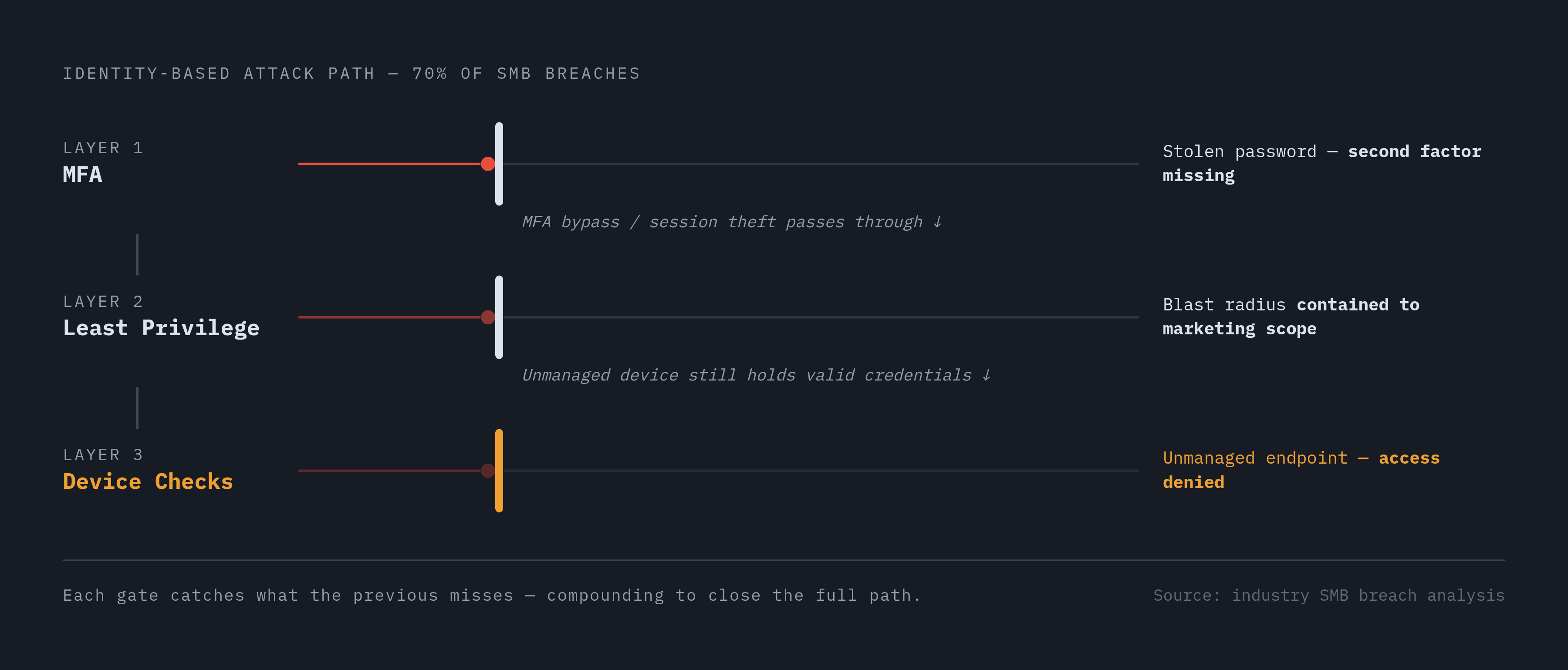
MFA, least-privilege access, and device-aware conditional access are not independent controls. They compound each other. Each one fills a gap the others leave.
MFA stops credential theft at the authentication layer. It blocks the attacker who has a stolen password but cannot complete the second factor. Least privilege limits the blast radius if an account is compromised anyway. It means an attacker who gets past authentication still cannot reach much. Device checks block access from unmanaged endpoints even when credentials are valid and MFA is satisfied. An attacker with a fully working login still cannot get in from a random device. Together they close the identity attack paths that account for the overwhelming majority of SMB breaches.
The expertise objection is the main thing that keeps small businesses from acting. The controls sound technical. Conditional access policies, privileged access management, device compliance all sound like work for a security team. But the configuration decisions are finite and well-documented. Cloud identity platforms, including those bundled with licenses SMBs already hold, expose these controls through guided setup flows, not command lines. Most of the work is turning on features that already exist and telling them what to require.
What "continuously enforced" means in practice is worth stating plainly. Once configured, conditional access policies and MFA enforcement run without manual intervention. The system checks every access request, not just the ones a human reviews. That is the difference between having a policy and having a control. An integrated platform that covers device management, identity protection, and compliance in one place removes the coordination burden that makes multi-vendor stacks unmanageable for lean teams. Zip is built for exactly this operating model, bringing the three controls together so a founder or IT generalist can enforce them without assembling a custom stack.
Where to go after the IAM foundation is in place
Once MFA, least-privilege access, and device checks are consistently enforced, the identity foundation is solid enough to support the next layer of Zero Trust maturity. Most small businesses should resist expanding scope until the basics are reliably in place. The sequence matters. A business that adds microsegmentation before fixing orphaned admin accounts is building on sand.
What the next phase covers is clear from Exabeam's Zero Trust 2026 guide. Microsegmentation, application workload protection, and continuous monitoring are the subsequent pillars. Each assumes a stable identity layer underneath. Microsegmentation restricts movement between systems, but only works if the identity of whoever is moving is known. Application workload protection secures the software itself, but that means nothing if anyone can log into it with weak credentials.
Identity controls will also evolve. Scalefusion's 2026 IAM trends points to AI-driven anomaly detection as an emerging capability. These tools build on baseline MFA and device compliance rather than replacing them. They look for the unusual login, the impossible travel pattern, the access request that does not fit the user's normal behavior. That detection is only meaningful if the baseline is enforced. Non-human identities are the next governance gap. APIs, bots, and AI agents are growing faster than human accounts. They need the same least-privilege discipline, and they are a near-term priority for SMBs adopting AI tools in their operations.
The compliance dividend matters for every business that sells to enterprises or carries cyber insurance. Organizations that have implemented these controls consistently find that they generate audit-ready evidence without additional effort. Access logs, device compliance records, authentication events: all of it gets produced by the controls themselves. The practical signal that the foundation is working is a specific outcome. A user account gets compromised. The blast radius is contained. The event is logged. No lateral movement occurs. That outcome is the goal, and it is achievable with the three decisions this article covers.
Sources
- Identity Access and Device Management: A Simple Model for Modern SMB Security | Zip Security
- Identity and Access Management that Blocks Unauthorized Access | Zip Security
- Navigating the Cybersecurity Landscape: A Deep Dive into Identity Solutions | Zip Security
- MFA for Small Business: How to Deploy Multi-Factor Authentication Across Every Employee | Zip Security